Scenario
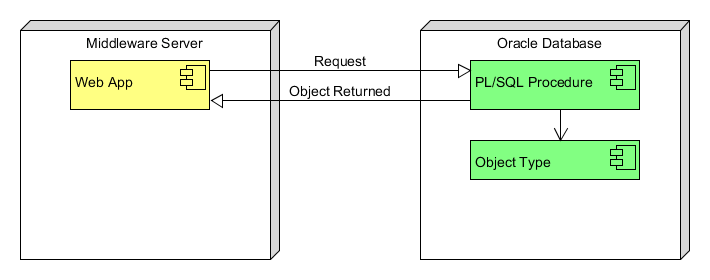
As the Oracle specialist on an application development team your goal is to provide an interface to the application data for use by team members developing in other tools such as a Java or .NET development platform.
| Object Type Application Interface Deployment Diagram |
|---|
 |
Traditional Method
You provide queries and perhaps views and/or materialized views for use by the team. Perhaps you provide functions or procedures that return cursors or maybe a Pipelined Table function. These are all perfectly valid methods for providing a two dimensional data structure of rows and columns to the application. You can build business rules into the queries and methods you provide, and assist with database operations where you add value to the team.
What if your data is more complex? When the data is logically represented by parent/child relationships with multiple child objects, the traditional method might simply duplicate common parent data on every row. The database client, a Java program for example, will likely build a method to consume this data, pulling the common data elements into one structure and the child data elements into another, rebuilding the logical relationship into memory. This is wasteful on multiple levels. There is bandwidth and memory waste with transferring the redundant data as well as the development time waste of recreating the structure after it had been flattened during the transfer.
Remember also that in a high volume environment, each round trip to the database has a real cost in time and resources. Most modern Web based applications are built using stateless, single operation connections from a pool. This is relatively efficient, but there is real overhead in time and resources for each separate database call. Whenever practical, it is better to retrieve necessary data in a single call rather than multiple round trips to the database (assuming memory is not the constraint).
Using Oracle Object Types
Modern Oracle database connectors provide classes and methods for consuming complex structures from the database in the form of database Types. These can be traditional record Types as well as complex Objects, which includes Collections. The Oracle drivers will transport the complex structures over the wire efficiently and convert them into native data structures. IDE’s usually have tools to see these object types when you point them at a database procedure, and assist with building custom structures and classes for consuming and accessing the data.
Object Hiearchy Example
Although Object types can have methods, we will focus on using them as a hierachical structure. The MAP method is defined in this example to make it convenient to sort the objects as they are collected. You may be able to use other techniques to sort before aggregating, but this is the recommended way. Don’t focus on that too much. The main point is that the Objects are basically Structures for our purpose.
We will use the HR sample schema for the demonstration. The example is contrived in that the overhead of putting the department data into a flattened row or running two separate queries, is minimal, and we would not bother normally. Pretend that we have a much larger common object, perhaps multiple disparate child arrays, and/or extremely high volume that will justify the added complexity.
CREATE OR REPLACE TYPE employee_udt AS OBJECT (
     last_name          VARCHAR2(25)
    ,first_name         VARCHAR2(20)
    ,email              VARCHAR2(25)
    ,phone_number       VARCHAR2(20)
    ,hire_date          DATE
    ,salary             NUMBER(8,2)
    -- for sorting
    ,MAP MEMBER FUNCTION full_name RETURN VARCHAR2
);
/
CREATE OR REPLACE TYPE BODY employee_udt AS
    MAP MEMBER FUNCTION full_name RETURN VARCHAR2
    IS
    BEGIN
        RETURN last_name||', '||first_name;
    END;
END;
/
CREATE OR REPLACE TYPE arr_employee_udt AS TABLE OF employee_udt;
/
CREATE OR REPLACE TYPE department_udt AS OBJECT (
     department_name    VARCHAR2(30)
    ,manager_last_name  VARCHAR2(25)
    ,manager_first_name VARCHAR2(20)
    ,arr_employee       arr_employee_udt
    ,MAP MEMBER FUNCTION dmap RETURN VARCHAR2
);
/
CREATE OR REPLACE TYPE BODY department_udt AS
    MAP MEMBER FUNCTION dmap RETURN VARCHAR2
    IS
    BEGIN
        RETURN department_name;
    END;
END;
/
CREATE OR REPLACE TYPE arr_department_udt AS TABLE OF department_udt;
/
Each department object will contain all of the employees in the department. The top level array of departments object is a single unit that can be transferred in one database call. Alternatively, if that object could be too large to be efficient, a cursor can return rows of department_udt objects, perhaps bulk fetched depending on how it is called. Here is a package that provides both. The query is written in multiple pieces using WITH subquery factoring to make it easier to follow (a practice I recommend to keep large queries easier to understand).
CREATE OR REPLACE PACKAGE employees_by_dept_pkg AS
    PROCEDURE get(p_arr_department OUT arr_department_udt);
    FUNCTION get RETURN arr_department_udt PIPELINED;
END;
/
CREATE OR REPLACE PACKAGE BODY employees_by_dept_pkg AS
    CURSOR g_c IS
        WITH d AS (
            SELECT hd.department_id, hd.department_name, he.last_name AS manager_last_name, he.first_name AS manager_first_name
            FROM hr.departments hd
            INNER JOIN hr.employees he
                ON he.employee_id = hd.manager_id
        ), e AS (
            SELECT department_id
                ,employee_udt(
                    last_name       => e.last_name
                    ,first_name     => e.first_name
                    ,email          => e.email
                    ,phone_number   => e.phone_number
                    ,hire_date      => e.hire_date
                    ,salary         => e.salary
                ) AS emp
            FROM hr.employees e
        ), e2 AS (
            SELECT department_id
                -- uses employee_udt.map method to sort
                ,CAST(COLLECT(emp ORDER BY emp) AS arr_employee_udt) AS arr_employee
            FROM e
            GROUP BY department_id
        ), d2 AS (
            SELECT department_udt(
                     department_name    => d.department_name
                    ,manager_last_name  => d.manager_last_name
                    ,manager_first_name => d.manager_first_name
                    ,arr_employee       => e2.arr_employee
                ) AS dept
            FROM d
            INNER JOIN e2
                ON e2.department_id = d.department_id
        ) SELECT dept
        FROM d2
        ORDER BY dept
        ;

    PROCEDURE get(
        p_arr_department    OUT arr_department_udt
    ) AS
    BEGIN
        LOOP
            -- if the cursor was previsously opened and not yet closed in this session
            -- then close it and try again.
            BEGIN
                OPEN g_c;
                EXIT;
            EXCEPTION WHEN CURSOR_ALREADY_OPEN
                THEN CLOSE g_c;
            END;
        END LOOP;
        FETCH g_c BULK COLLECT INTO p_arr_department;
        CLOSE g_c;
    END;

    FUNCTION get RETURN arr_department_udt PIPELINED
    AS
        v_arr_department    arr_department_udt;
    BEGIN
        LOOP
            -- if the cursor was previsously opened and not yet closed in this session
            -- then close it and try again.
            BEGIN
                OPEN g_c;
                EXIT;
            EXCEPTION WHEN CURSOR_ALREADY_OPEN
                THEN CLOSE g_c;
            END;
        END LOOP;

        LOOP
            -- pretending object is very large, thus small limit
            FETCH g_c BULK COLLECT INTO v_arr_department LIMIT 20;
            EXIT WHEN v_arr_department.COUNT = 0;
            FOR i IN 1..v_arr_department.COUNT
            LOOP
                PIPE ROW(v_arr_department(i));
            END LOOP;
        END LOOP;
        CLOSE g_c;
        RETURN;
    END;
END employees_by_dept_pkg;
/
To call the procedure version from a language using an Oracle database driver you would typically find the package in your IDE interface and allow it to help you build a class to call the procedure and populate an internal structure via the OUT parameter. For us mere mortals restricted to standard database tools such as sqldeveloper, we can use the pipelined table function
SELECT *
FROM TABLE(employees_by_dept_pkg.get);
Here is one row as represented in sqldeveloper query result window:
| DEPARTMENT_NAME | MANAGER_LAST_NAME | MANAGER_FIRST_NAME | ARR_EMPLOYEE |
|---|---|---|---|
| Accounting | Higgins | Shelley | LEE.ARR_EMPLOYEE_UDT(LEE.EMPLOYEE_UDT(‘Gietz’, ‘William’, ‘WGIETZ’, ‘515.123.8181’, ‘2002-06-07 00:00:00.0’, 8300), LEE.EMPLOYEE_UDT(‘Higgins’, ‘Shelley’, ‘SHIGGINS’, ‘515.123.8080’, ‘2002-06-07 00:00:00.0’, 12008)) |
A query that joins back to the employee object column flattens it back out to one record per employee with duplication of the department information, but at least we can see everything.
SELECT department_name, manager_last_name, manager_first_name, e.*
FROM TABLE(employees_by_dept_pkg.get) d
INNER JOIN TABLE(d.arr_employee) e ON 1=1
WHERE rownum <= 10
;
| DEPARTMENT_NAME | MANAGER_LAST_NAME | MANAGER_FIRST_NAME | LAST_NAME | FIRST_NAME | PHONE_NUMBER | HIRE_DATE | SALARY | |
|---|---|---|---|---|---|---|---|---|
| Accounting | Higgins | Shelley | Gietz | William | WGIETZ | 515.123.8181 | 07-JUN-02 | 8300 |
| Accounting | Higgins | Shelley | Higgins | Shelley | SHIGGINS | 515.123.8080 | 07-JUN-02 | 12008 |
| Administration | Whalen | Jennifer | Whalen | Jennifer | JWHALEN | 515.123.4444 | 17-SEP-03 | 4400 |
| Executive | King | Steven | De Haan | Lex | LDEHAAN | 515.123.4569 | 13-JAN-01 | 17000 |
| Executive | King | Steven | King | Steven | SKING | 515.123.4567 | 17-JUN-03 | 24000 |
| Executive | King | Steven | Kochhar | Neena | NKOCHHAR | 515.123.4568 | 21-SEP-05 | 17000 |
| Finance | Greenberg | Nancy | Chen | John | JCHEN | 515.124.4269 | 28-SEP-05 | 8200 |
| Finance | Greenberg | Nancy | Faviet | Daniel | DFAVIET | 515.124.4169 | 16-AUG-02 | 9000 |
| Finance | Greenberg | Nancy | Greenberg | Nancy | NGREENBE | 515.124.4569 | 17-AUG-02 | 12008 |
| Finance | Greenberg | Nancy | Popp | Luis | LPOPP | 515.124.4567 | 07-DEC-07 | 6900 |
Conclusion
The technique of using Oracle Object Types to represent complex data can be an efficient way to provide applications what they need in a format that is well suited. It allows the back-end database developer the opportunity to shelter the human interface developer from needing to understand the full database model. Instead they can focus on the data model presented to them at the application level. This also enhances the ability to put business rules into the database back end as opposed to (or in addition to) building that logic on the front end. That may or may not be a desired approach for your organization, but at a minimum the business logic that is necessary at the database level can be enforced.